Why your serve isn't improving — find the fix in one phone video
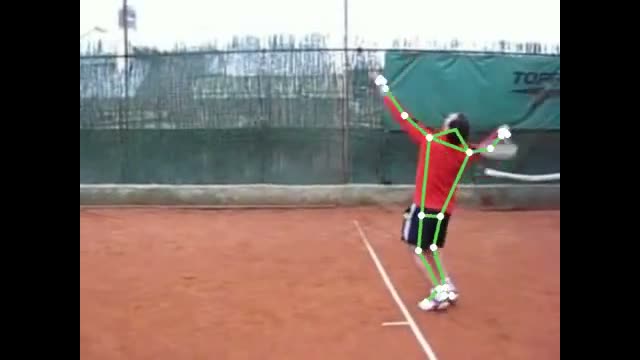
Upload one phone video of your serve. You get a skeleton overlay, your trophy position, contact height and rhythm measured against reference ranges, and the 1–3 fixes to work on first, each with a drill.
- Free on the web · no account · report in about a minute
- Film side-on or from behind: 10–30 seconds, whole body in frame
- Your report sits at an unlisted link; the video is deleted within 30 days
How it works
Film one or two strokes
Phone on a tripod, side-on or from behind, whole body in frame.
We find your skeleton
Pose tracking marks 33 body points in every frame and finds your trophy position, racket drop and contact point.
Get your priorities
Up to three things to work on, in order. Each one says what we saw, why it matters, the cue to use and a drill with reps.
Six serve checkpoints: what one video shows
We track your body, not the ball or the racket. Each checkpoint says plainly what your report measures and what it can’t.
1. Toss
Not measuredWhere the ball goes isn’t tracked. We do time the toss against the trophy position and contact.
2. Trophy position
MeasuredKnee bend and trunk lean as you load.
Read the guide3. Racket drop
“Possible” flag onlyInferred from the wrist and elbow path, so it’s only ever flagged as “possible”.
Read the guide4. Contact
MeasuredContact height and how straight the hitting arm is at impact.
Read the guide5. Rhythm
MeasuredA pause or hitch between toss and contact, and whether legs, trunk and arm fire in order.
6. Landing
Not measuredBalance and follow-through after contact aren’t scored yet. You can watch them on the overlay video.
What a single phone video can and can’t measure
The honest scope of 2D pose analysis from one camera.
| What | From one phone video |
|---|---|
| Joint angles in the camera plane: elbow, knee bend, trunk tilt | Measured |
| Contact point relative to the front hip (side-on view) | Measured |
| Order and timing of hip, shoulder and arm movement | Measured |
| Serve trophy position, arm extension and contact height | Measured |
| Shoulder turn and hip–shoulder separation (3D rotation) | Estimate only |
| Racket drop: inferred from the wrist path, flagged as “possible” | Estimate only |
| Wrist and forearm rotation (pronation) | Not measured |
| Ball speed, spin and placement | Not measured |
| Grip and racket-face angle | Not measured |
Sample reports
Real reports from the analysis engine, including one it refused.
Filming guide
Good footage is most of the analysis. Two minutes of setup gets you a complete report.
- Film side-on or from directly behind. Front-on angles hide your contact point.
- Keep your whole body in frame, head to feet, with room for the racket.
- Hold the phone landscape, on a tripod or a fence at about hip height.
- Record at 60 fps or more. Upload the normal-speed file, not a slow-motion export.
- Stand the camera 4–6 meters from the player.
- Keep it to 10–30 seconds with one to three strokes, in good light.
Where to put the camera
Start from the symptom
The serve problems players ask about most, and what one video can show about each.
- Why is my serve so weak?A weak serve has five common, visible causes. Match your symptom to the checkpoint behind it, then confirm which one is yours with one phone video.
- My serve has no power — find the broken linkServe power comes from legs, trunk, shoulder, elbow and wrist firing in order. Find the broken link in your chain and the drill that fixes it.
- Why does my serve go into the net?Serves that hit the net are usually hit too low: a bent arm, an arm not high enough, or contact below your reach. How to check and fix each one.
Not just the serve
Forehand, backhand and volley get a basic check with the same skeleton tracking.
How do I find out what is wrong with my serve?
Film one serve from the side or from behind, upload it, and read the 1–3 fixes the analysis ranks for you. Most serves stop improving because players practice without knowing which part of the motion is the real limit.
- 1. Film: phone on a fence or tripod, landscape, whole body and the racket above your head in frame. 60 fps recommended, 30 fps works.
- 2. Upload: pick 'serve' and your hitting hand. One stroke type per clip, up to 60 seconds.
- 3. Fix: about a minute later you get a skeleton overlay, key frames and up to three prioritized fixes, each with a cue and a drill.
Which serve checkpoints does it check?
Six checkpoints make up the serve; the analysis measures four of them from your body and flags a fifth as 'possible'. The ball and racket are not tracked.
- Toss: placement is not measured (the ball is not tracked); the timing from toss to contact is.
- Trophy position: front-knee bend and trunk lean are measured.
- Racket drop: only ever a 'possible' flag, read from the wrist and elbow, because the racket is not tracked.
- Contact: contact height, elbow extension and how high the hitting arm is raised are measured.
- Rhythm: a pause between trophy and contact, toss-to-contact timing and the legs-to-arm sequence are measured.
- Landing: not scored; you can still watch it on the overlay video.
What doesn't it measure?
- Serve speed and spin are not measured. A radar or ball-tracking app is the right tool for that.
- Toss placement, forearm pronation, grip and racket-face angle are not measured, because neither the ball nor the racket is tracked.
- Where the serve lands is not tracked, so fixes are based on body positions and timing only.
My serve is weak, has no power or goes into the net — where do I start?
- Weak serve: start with the diagnosis guide that maps each symptom to the checkpoint behind it.
- No power: usually a broken chain from the legs up — little knee bend, a pause at the trophy or a shallow racket drop.
- Into the net: usually low contact — a bent arm or a hitting arm that is not high enough at contact.
- Double faults: rhythm and contact height are the measurable parts; toss consistency you check yourself.
Can it check my forehand, backhand or volley too?
- Yes. Forehand has a full rule set (contact point, unit turn, elbow spacing, hip rotation, finish, leg load).
- Backhand and volley get a basic check today.
- The site is built around the serve, the stroke recreational players most often practice alone.
Ready to see your serve?
- Upload one serve clip now, or open the sample serve report first to see what you will get.
- 1–3 fixes + drills in about a minute · a few free analyses per day on the web · no account.
Questions
Does it measure serve speed?
No. Serve speed needs radar or ball tracking. Improve My Serve analyzes your technique: body positions and timing.
Can it see my toss?
Not the ball. Toss placement is not measured because the ball is not tracked. It does measure toss-to-contact timing, and the serve toss guide shows how to check placement yourself.
Is it free?
Yes. On the web you get a few free analyses per day with no account. An iOS app is also available on the App Store.
Is an AI serve analysis as good as a coach?
No. It is reliable for clear body-position faults and for tracking change over weeks, but a coach sees ball flight, grip and feel. Use it between lessons, not instead of them.
What video should I upload?
A landscape clip under 60 seconds of one serve type, from the side or behind, with your whole body and the racket above your head in frame. 60 fps is recommended. If you film in slow motion, upload the original file so contact timing stays precise.
Ready when you are
Pick a clip from your camera roll. The analysis takes about a minute.